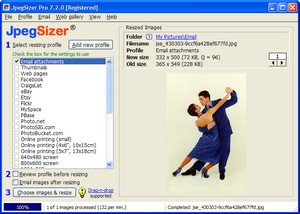
|
Batches
of Any Size
|
|
 Resize single images or batches of any size Resize single images or batches of any size
|
|
Resize entire folders of image files
|
|
Use drag-and-drop or copy-and-paste to resize files or folders selected from Windows,
a thumbnail viewer or graphics editor
|
|
Resize files or folders from the
Windows Send To context menu
|
|
Repeat the
last batch or select from recent images
|
|

 Resize images using multiple profiles in the same run (e.g. full-size
and thumbnail images for a web site)
Resize images using multiple profiles in the same run (e.g. full-size
and thumbnail images for a web site)
|
|
Option to include files
in subfolders when resizing all files in a folder
|
|
Profiles
Remember Resizing Parameters
|
|
Stores
profiles for different projects
|
|
Includes default
profiles for many common projects
|
|
Edit
existing profiles or add new ones
|
|
Make temporary changes to
profile for each batch
|
|
Export profiles to other users
|
|
Resizing Rules
|
|
Reduce
or enlarge images to any desired size
|
|
Resize by
longer side so vertical and horizontal images have the same size
|
|
Resize by
shorter side, width, height or both
|
|
Fill both width and height dimensions by
auto-cropping, increasing the canvas size, or stretching images
|
|
Resize
to a percentage of original size.
|
|
File
Formats & Image Compression
|
|
Resize original images
in these formats: JPEG, TIFF,
JPEG-2000, GIF, PNG, BMP and PCX
|
|
Save resized images in
these formats: JPEG,
GIF,
PNG, TIFF
and BMP.
|
|
Automatically calculates JPEG quality (compression) needed to achieve desired file
size -- no more trial-and-error!
|
|
Borders, Captions and Watermarks
|
|
Add borders to resized
images in any color and width
|
|
Add captions or watermarks to resized images in any text font and color,
with optional text smoothing
|
|
High
Image
Quality
|
|
Control the sharpening of resized images
|
|
Advanced Lanczos3
resampling algorithm
|
|
Choice of 12 different
resampling algorithms for resizing
|
|
Flexible
File
Naming
|
|
Keep original filenames,
add a prefix or suffix, or rename
files with auto-numbering
|
|
Convert filenames to all
lower or upper case
|
|
Replace spaces in filenames with underscores
|
|
Use variables in
filenames (e.g. file dates)
|
|
Timestamp resized files to match original files
|
|
Options
After
Resizing
|
|
On-screen
preview of resized images, with zoom and pan
|
|
Old and
new dimensions and file sizes displayed for checking
|
|
Built-in emailer to send images using your email client program
|
|
Built-in web gallery
designer, builder and uploader
|
|
DPI,
EXIF &
IPTC |
|
Set the DPI
of resized images to any value
|
|
Option to
auto-rotate images by applying the EXIF orientation tag
|
|
Option to copy EXIF and/or IPTC data from original to resized files
|
|
Automation
|
|
Monitor a watch folder for automatic processing of deposited files
|
|
Control JpegSizer from other
applications, using command line switches
|
|
Maintain a log of resizing statistics and errors
|
|
Use the
JpegSizer DLL (available separately) to
embed JpegSizer's resizing technology in your own applications
|
|
Networks
& Large Files |
|
Full support for files on local networks
|
|
Resize the huge image files that cause other programs to crash
|
|
Help, Support
& Updates
|
|
Built-in
Quick Start Guide for
immediate results
|
|
Extensive
Help system included
|
|
Printable
PDF manual included
|
|
Free technical support via
email
|
|
Priority
technical support
|
|
Free
minor software updates
|
|
Free lifetime major software updates
|
|
Start
resizing photos now!
Back
to top
|